
Problem, approach, outcome
01Problem
I take screenshots all day: client dashboards, WordPress admin, analytics, email drafts. For years that meant FireShot and Awesome Screenshot. Both work, but popular screenshot extensions typically ask to “read and change all your data on all websites,” and they update themselves silently. If one is sold or its developer’s account is compromised, that access can change hands overnight, and the screens I’m capturing are exactly the ones I least want exposed.
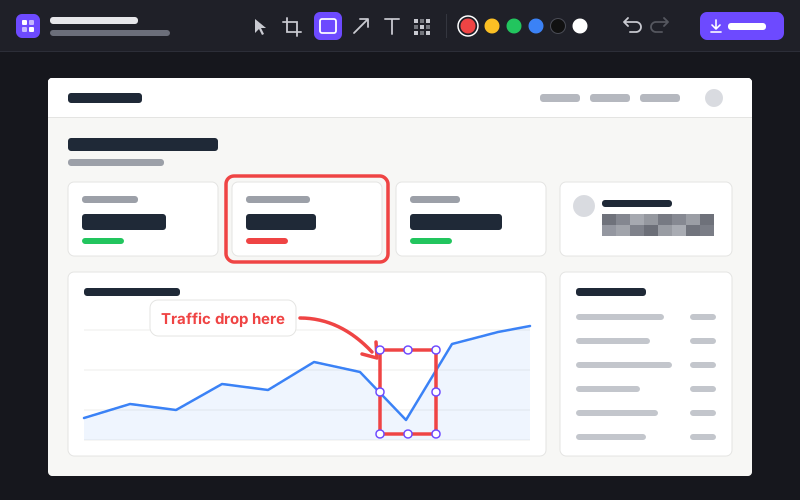
They had also drifted from what I need. Awesome Screenshot pushes cloud saving and sign-in; FireShot puts features like the Mac editor behind a paid Pro tier. I use five tools — crop, boxes, arrows, text and blur — and I wanted those five done well, privately.
02Approach
Start from the permissions and work outward. Pixel Stash asks for four: activeTab, which grants access to a page only when I click the toolbar icon, plus scripting, downloads and storage. There’s no blanket access to every site. The extension pages run under a strict Content Security Policy that only allows network connections to the extension itself, so even a bug can’t send a screenshot anywhere. And it’s loaded unpacked from my own folder, so no one else can push an update to it.
The capture modes are where Chrome makes you work for it. Full Page scrolls one screen at a time, captures each one within Chrome’s limit of two captures a second, and stitches them together. It hides scrollbars, and after the first screen it hides fixed headers and chat bubbles so they don’t repeat down the image, then puts your scroll position back.
For the editor I compared plain canvas, Konva and Fabric.js, and chose Fabric: it already handles selecting, moving and resizing shapes, which is most of what an annotation editor is. It’s vendored as a single pinned file with its checksum recorded, so the code that runs is the code I reviewed.
Redaction is destructive by design. Pixelate and solid black are burned into the saved PNG; a soft blur isn’t offered at all, because blurred text can sometimes be reconstructed. The original capture never leaves the extension’s own storage and is deleted after 24 hours.
03Outcome
I’m moving my everyday screenshot work over to Pixel Stash now, and FireShot and Awesome Screenshot are on their way out of my browser.